Pages

Gymboree Sale On Now!
Showing posts with label app. Show all posts

08 October 2015

Kids Academy Releases Preschool Education Center App for iOS and Android

This blog has partnered with Mom Muzz Media to announce this exciting information!

Kids Academy Releases Preschool Education Center
for iOS and Android!


Hey Moms and Dads! A great app has been introduced recently to teach your kids the alphabet, reading, writing, vocabulary, and math skills. All these in once great app!

Kids Academy – the team behind some of the top educational apps for kids with over 10 million downloads worldwide just released the long-awaited version of their flagship app – Preschool Education Center.

As the name suggests, Preschool Education Center is an all-in-one educational app for kids and toddlers. The app covers all aspects of early childhood education from the alphabet and reading to writing, building vocabulary and developing math skills. Based on the proven Montessori method the app offers a number of fun games that help master essential learning skills through play.

Check out my review in Google Play:


Until now, Preschool Education Center has only been available on iTunes but today's release makes it finally available for Android device on Google Play! This fun and free app is currently being featured in the Family section of the Android store in the USA, Australia and Canada.

Get the app free on Google Play!

..........................................................................................

iTunes Kids AcademyFor iOS devices:

Kids Academy have also updated the iOS version of the app: Preschool & Kindergarten Early Learning Games adding new games, books and educational cartoons and shows as well as printable worksheets.

- The update boasts a bunch of cute little monsters that will teach your kids about money and how to count it.

- Kids Academy TV now has a 24/7 Live Zoo channel offering web-cam views on real-life animals.

Grab your free copy of the update on the iTunes App Store!

..........................................................................................
free worksheets

BONUS!
Free Preschool & Kindergarten Worksheets for Kids

Kids Academy is also finding a way to expand beyond the screen and help master pen and pencil with free printable worksheets. You can get free preschool worksheets on a variety of subjects from alphabet to math (the library is being constantly updated).

Download, print out and get start practicing with good old pen and paper in seconds!

Head over to to the Kids Academy to get your FREE PRINTABLE WORKSHEETS and get your kids busy!


19 September 2014

Review - Watermark Plus for Mac App from PearlMountain Soft


One of the grueling things bloggers do when they post articles with photos is to put their "digital stamp" of ownership and copyrights on the photos. I find that time consuming and really cumbersome at times because I do product reviews and I always put pictures of the products when I post about them.

I usually use another program to stamp my credits on my photos one by one. It takes me a lot of time to do that especially when there are plenty of pictures to be posted. This app called Watermark Plus for Mac from PearlMountain Soft is a great software to use because:


  • Saves me a lot of time in stamping my credits to each picture
  • It stamps your watermark on all the photos you uploaded in the app
  • It supports a lot of image formats when importing various images
  • You can add text and image watermarks to a collection of photos in one go
  • It has a "smart fit" capability where watermarks will be assigned to different sizes of photos
  • You can batch resize and rename the photos
  • There is a features of real-time preview
  • You can zoom in and out
  • Easy to use
  • Lots of  ready made watermark designs to choose from


This app is available for Mac and you can buy it for $4.99 from https://itunes.apple.com/us/app/watermark-plus/id904186384?mt=12
Check out this tutorial on Watermark Plus for Mac here: http://www.pearlmountainsoft.com/watermarkplus/tutorials.html


This is a handy app to use especially when you are posting plenty of pictures using similar watermarks. I will certainly use this for my review photos so I don't have to type my credentials in all my photos next time.


25 July 2014

Review - Picture Collage Maker 3 App for Mac From PearlMountain Technology


Do you fancy making collages of your photos to create memorable projects to save and share to family and friends? Do you use a complicated program to make collage? If so, time to switch to a more user-friendly and fun-filled features app to make pretty, fun, interesting and colorful collages to show those beautiful pictures to everyone!

Picture Collage Maker 3 is an app from PearlMountain Technology. It is a very user-friendly app for Mac which creates collage projects.


Here are its key features:

• More template to choose from!
• You can create photo collages, greeting cards, scrapbook pages, posters, CD covers, photo calendars, photo books, flyers, and so much more!
• Import photos directly from iPhoto, Aperture, Lightroom, etc. Export to iPhoto directly.
• Share to iMessage, AirDrop, Twitter, Facebook, Flickr within the app on Mac OS X 10.8.
• Templates are suitable for any occasion – Travel, Birthday, Graduation, Baby Announcement, Anniversary, Easter, Christmas, Thanksgiving, Wedding and so on.
• Drag and drop photos in collage. Import photos directly from iPhoto, Aperture, Lightroom, etc.
• Add and edit multiple pages to create photo albums and scrapbooks with numerous pages.
• Move, rotate, and resize photos with a few mouse clicks.
• Crop photos to make them fit well in frames.
• Zoom in/out on editing area to view details of collage. You can also edit collage in full-screen mode.
• Decorate collage with embellishments
• Apply photo effects/filters to beautify your photos.
• Use various background patterns to produce good looking collages. Customize background with your own images.
• Apply special frames, masks, and clipart, etc to personalize your collage.
• Make collage looks even better by resizing, dragging and positioning clipart.
• Add text – resize; rotate; apply shadow & text effects of Stroke, Glow, and Background to make your text unique.
• Add calendar to create personalized photo calendars.
• Save collage as image formats – JPG, TIFF, BMP, PNG, GIF, PSD.
• Save collage as PDF file.
• Export collage to iPhoto directly.
• Set collage as desktop wallpaper.
• Share collage with friends and families via Facebook and E-mail. Share collage to Message, AirDrop, Twitter, Facebook, Flickr within the app on Mac OS X 10.8.
• Print collage directly.


The app have plenty of features and functions even ordinary John and Jane can use without any difficulty. I enjoyed using this product because now, with the number of features I can use in so many ways, I can create a lot of projects just using the Picture Collage Maker 3 app. I don't have to use other softwares for different purpose.

This app is also available in Windows system.


Price: $19.99 * * * 30% Off Time Limited Holiday Offer * * * (original price is $29.99)

Compatibility: OS X 10.6 or later, 64-bit processor

You can download this wonderful app from iTunes or check this site for more info:

https://itunes.apple.com/us/app/picture-collage-maker-3/id715483503?mt=12


To know more about PearlMountain Technology's apps, please visit their website.


Disclaimer:
I have not been compensated in this review. I received this full version as part of an advertorial/evaluation purposes. My feedback and evaluation is based on my findings and experience with the use of the app. My opinion is 100% mine and may vary from yours. I only review product/services that  like and will use.


09 June 2014

Press Release on VideoGif 2.0 from PearlMountain

Below is a press release from PearlMountain Technology Co. Ltd, the maker of some great apps I use for my Mac.

VideoGIF 2.0 Updates with Smashing Features of Stickers, Managing overlays and More


PearlMountain Technology Co., Ltd announced an important update of VideoGIF 2.0 for Mac recently. The easy-to-use GIF creator now enables users to add stickers, rotate stickers, and manage overlays, etc.

VideoGIF is the most agile app for creating animated GIFs by trimming any part from a video/movie. Users can add video from video files or Webcam. Next, they can effortlessly adjust color, apply filters, crop and resize the GIF. And they are able to insert and customize text, adjust the GIF speed and preview the result in real-time. Better than ever, the latest VideoGIF 2.0 even allows users to add stickers, rotate stickers & texts at ease, manage overlays and more.

After a satisfying GIF is done, users are able to share the GIF with friends via Mail, iMessage, Tumblr or to simply save it in Finder.

New Key Features:
l  Add stickers: Users can choose from 40+ preset stickers to refine the GIF. Their own images can also be used as stickers.
l  Free to manage overlays: With this feature, users are able to set opacity, adjust layers and customize frame range for stickers & texts with incredible ease.
l  Rotate texts and stickers at will: VideoGIF 2.0 empowers users to freely rotate texts and stickers to fit their needs much better.

Other Fantastic Features:
l  Trim the video freely: Customers can trim any part of the video at ease to create their GIF. Even if users load a video over 1-2 hours, they can trim their favorite part easily.
l  Crop, resize and fine-tune Functionality: Crop the video clip by ratios or custom to make the GIF fit better. In order to adjust the GIF size, VideoGIF also makes it possible to resize the clip by scale.  Customers can further adjust colors by setting Saturation, Hue and Exposure, etc. and apply popular filters such as Black & White, Sepia, Vintage and more.
l  Insert and edit text: VideoGIF has been integrated with powerful text editor for customers to insert text and customize text font, size, alignment, color and shadow, etc.
l  Customize GIF speed with real-time preview: VideoGIF makes it possible to adjust GIF speed intuitively. More importantly, with VideoGIF’s real-time preview functionality people could view the GIF immediately on the left preview panel.
l  Save and share GIF: Quality optimization is available when users export the GIF. People can just save it in Finder, share via Tumblr, iMessage (only for Mac OS X 10.8 or above) and Mail, etc. Do whatever to suit their needs.

VideoGIF is the new solution for people to create lively and amazing GIFs from funny videos or their favorite movies. Given the powerful features and intuitive interface, users of none experience in photography can create wonderful GIFs from videos with VideoGIF.


Pricing and Availability
VideoGIF requires Mac OS X 10.7 or later. It is fully compatible with Mac OS X Mavericks. The original price of this app is $19.90. However, during the limited time promotion, users can get the app from Mac App Store at only $4.99. 

Links
Product page on PearlMountain:
http://www.pearlmountainsoft.com/videogif

Product page on App Store:
https://itunes.apple.com/us/app/videogif/id807363401?ls=1&mt=12

About the Company
PearlMountain Technology Co., Ltd is a dedicated graphics software developing company founded in 2006. Over the past 7 years, it has released products enjoying great popularity among worldwide users like Picture Collage Maker, CollageIt and PearlMountain Image Converter.

Its products have been well received all through North America, Europe and Asia software markets for their ease of use, reliability and superior performance.


Media Contact
David Lin
PearlMountain Technology Co., Ltd
CEO
Email: info@pearlmountainsoft.com


02 June 2014

Review - Weight Gurus Smartphone Connected Bathroom Digital Scale

Disclosure: I got this product as part of an advertorial.


I am in my quest to stick to a healthy eating habits, regular exercise routine and a lifestyle change to accommodate more activities in my day-to-day tasks. I work 8.5 hours a day for 5 days in a week and by the time I get home, I am tired. So, I practically have little energy left to exercise and follow through.

I am glad I received the Weight Gurus Smartphone Connected Bathroom Digital Scale because I can keep a tab on my progress without me feeling aimless in my weight loss goal.

The Weight Gurus Bathroom scale is very high-tech and I am so impressed. There are many great features about this product and here they are:


Auto Step-on (turns on automatically when weighing) and Auto Off
Auto calibration
Auto user detect (important for multi-user homes - e.g. husband/wife)
It can support up to 8 users
Non-slip, scratch resistant feet
4 ultra-precision weighing sensors
400 lb capacity. +/- .1 lb resolution
Durable tempered glass construction
Large weighing platform (150 sq inches)
Extra Large, Backlit LCD (4.3")
You choice of metric conversion - Kg / Lbs
Works on 4 AAA batteries and upon purchase, batteries are included.


Aside from those features, it uses weightless technology where it is designed to encourage weight loss.
The FREE Weight Gurus App tracks progress which encourages you to reach your goal. The Weightless feature lets you manage your weight by how much you've lost instead of how much you weigh. With Weightless you decide how to view your weight - by the number (e.g. 173.4lbs) or weightlessly by weight change (e.g. -12lbs).

And here is another super fabulous feature - you can sync the result from the weighing scale to your smartphone (iPhone or Android devices are acceptable). This way, you can view, track and chart your progress. Smartphones are not required at all when you purchase the scale and use it. It is just a helpful additional for your to track your progress).

The product has a 5 years warranty.

Price: It is sold for $39.99 but you can get it off $10 less using this code upon checkout: GETGURUS

To order this product, please check from Amazon.

My recommendation:
Definitely! I am glad to have this product for my family to use. It gives an added motivation on my part to see better results and progress so I work double time in achieving my weight loss goals. Aside from the features I have mentioned, I like the fact that it's a smart scale where it can sync with my Android phone and capture the weight from the big LED light using the scanning technology of smartphones which is already integrated in the Weight Gurus app when you download it.

Don't think twice. This is a worthy product to purchase.

Know more about the product by visiting their site and other social media platforms:
Website: becomegurus.com
Facebook: facebook.com/becomegurus
Twitter: @becomegurus


I received one or more of the products mentioned above for free using Tomoson.com. Regardless, I only recommend products or services I use personally and believe will be good for my readers.


21 May 2014

Review - Publisher Plus for Mac from PearlMountain Technology


There are times when you will require a software or program that is inexpensive, easy to learn and yields fast result. And you normally don't achieve that using desktop publishing tools available in the market. But what will you do if I tell you there is one software that is only being sold for $19.99 in Mac app store, almost just a fraction of the famous desktop and illustrating tool out there?

Well, the common reaction to that news is a sigh of relief or a jump for joy but whatever your reaction is, PearlMountain Technology have you in mind when they developed the Publisher Plus for Mac so that you don't spend hundreds of dollars just to buy an app that you can use for creating greeting cards, menu, flyers, brochures, envelope labels, invitations, certificates, newsletters, adverts, reports, calendars, posters, and any printed materials you may need for your personal use or business.

Publisher Plus for Mac is a desktop publishing app that helps you create and design printed materials such as the ones I have mentioned above.


It's features are the following:

Key Features
Professional templates and decorations
•170 plus professional templates for flyers, brochures, newsletters, adverts, reports, calendars, posters, booklets, and more.
•Hundreds of delicate clipart.
•230 plus professional backgrounds.
•40 plus photo frames and masks.


Page setup
•Customize page size and orientation (landscape and portrait) of the page.
•Support customizing page margins.
•Create and edit multiple pages.

A variety of page objects
•Photo objects from iPhoto or from any folder in Finder.
•Apply delicate clipart to make the page looks amazing.
•Insert text object and edit the color, font, size, line spacing, text wrap and more.
•Add various preconfigured shape objects or create custom shapes.
•Add calendar to create custom calendars.


Editing features
•Reposition & resize, rotate any object at ease.
•Personalize opacity, mirror effect & flip of the objects.
•Select 230 plus preset backgrounds or customize background with your own images.
•Add color fill, stroke and shadow to any object.
•Select multiple objects to align, center and make same size of the objects as a whole.
•Auto snap between one object and another, and between an object and the page margin as well.
•Crop photo or manipulate the frame easily.
•Apply frames, mask, filters, etc. to photos and it is easy to adjust image colors.
•Manage layers of different objects.
•Support undo/redo, copy/paste and other common editing features.
•Support zooming in/out on the page, and Fit Width/Fit Page to view the page.
•Support displaying rulers in the editing panel for better alignment of objects.


Export, print and share conveniently
•Print the pages directly.
•Export the pages as JPEG, TIFF, PNG, etc.
•Share the pages via Email, Message, Airdrop, Twitter, Facebook and Flickr.

Price: $19.99 in iTunes/Mac App store

Compatibility: OS X 10.6.8 or later, 64-bit processor

My recommendation:

I recommend this software to everyone who needs to create materials usually done with an expensive desktop publishing tool. This is a very inexpensive application you can use without having to learn the nitty-gritty details of desktop publishing. It is simple and easy to use too! The outcome is professional looking prints that can be compared to the ones done by a professional. I will go for this app.


You may check this video out and watch the tutorial: https://www.youtube.com/watch?v=ejcrX4NKpvo

Disclaimer:

I received this full version of Publisher Plus from PearlMountain Technology for evaluation purposes. My findings/opinion are all 100% mine and may vary from yours. I only review products/services that I like, will use and find to be beneficial to my readers.


16 May 2014

Protecting Your Internet Usage While Traveling With TunnelBear


If you're a traveler like me, you will find that connecting to a public connection in the airport lounges, cafes or any public areas can be very daunting. I take my internet usage very seriously because I don't want to fall prey to malicious hackers, trackers and phishing activities running amok in the net.

So, what do I use to keep my sanity and sense of security intact while browsing privately? TunnelBear, of course! You might wonder what TunnelBear is all about. Let me give you a rundown of what it does here. But before that, what is TunnelBear? TunnelBear is an application you can download to your PC, Mac, smartphones and devices running on Android and iOS.  And here are the things which makes TunnelBear a must to use when you're on-the-go:


  • Smart private browsing
  • Browse sites like Netflix, Pandora and other inaccessible sites from your country as if you are living in another country
  • Uses the concept of VPN (Virtual Private Network) for a private, safer and secure browsing experience while on the go
  • Block the website trackers like ads, analytics, scripts, social buttons that track everything you and your family do online. 


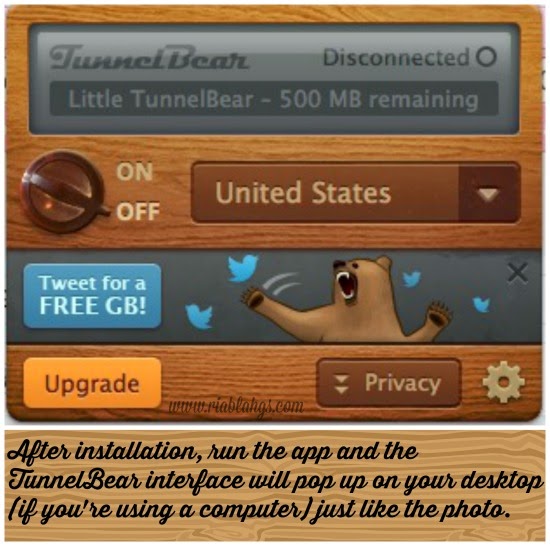
This application is very simple to download, install and use. Check out my step-by-step illustration below to help you get going after you have downloaded the app from the following places:

TunnelBear download page
TunnelBear iTunes store
TunnelBear Android Play store


When you click on the drop down menu beside the ON and OFF knob, you'll be given several choices on which country you want to connect to.


And if you want to tweak the preferences for your usage of TunnelBear, just click on the gear.


Once you've set up your preferences, you can now start browsing as you would in that country you have chosen. 


And just to give you a scenario on what it's like without TunnelBear, check the photo below.


TunnelBear is a great app that I highly recommend to everyone who's always on-the-go and needs privacy, security and safety while browsing. Currently, you can sign up in TunnelBear and choose the options you want as a member. You can get the cute bear cub, go Giant or be the Grizzly. Your call!

Photo credit: tunnelbear.com

You'll be "bear-y" happy that you've chosen to download this app. Use it wherever you go and have that peace of mind.

You can find more information about this amazing app from Tunnelbear.com site.


09 May 2014

Review - PhotoSweeper for Mac from Overmacs/Gwinno Software


I think most bloggers will agree to me when I say that bloggers tend to keep so many photos in their computers, flash drives, hard disks and even in their cloud storage. Do you agree? Well, I certainly do. I love taking snaps because I use them for my articles and product/service/hotel reviews and what's an article or review without any valid proof such as image to support them? Right?

Needless to say, my computer and anywhere else I can store my digital photos are bursting at the seams. I think most of the time, I just click and click but forget to delete photos that are duplicate, taken in series and even substandard. This is where PhotoSweeper comes into the picture, no pun intended!

PhotoSweeper is an app in Mac developed by Overmacs/Gwinno Software. It is a great app that will save you time from searching through your photos and remove duplicate copies and even similar ones.


Here are its features:
-Sweeps through your stash of digital photos, compares them and removes duplicate and similar copies
-You can drag and drop your individual photos or even the entire folder from your repository or from iPhoto, Aperture and even from Adobe Lightroom
-You can filter and adjust the ways you want the pictures removed either from the image size, date it was taken, file name
-It is very fast in scanning all your photos
-It will mark any duplicate and similar photos after scanning before you can move them to the trash
-It supports other formats such as DNG (Digital Negative by Adobe) which is commonly used by Lightroom, Photoshop and other Adobe programs
-You can lock the photos you do not want to be moved to the trash
-You can unmark photos that have been marked by PhotoSweep as similar or duplicate by right-clicking and choosing "unmark" from the dialogue box
-Easy to use and very fast


Compatibility:
This app is compatible with Mac using OS X 10.6.6 or later

Price: $9.99 in Mac app store

My recommendation:
I highly recommend this to everyone. This is great for photographers, bloggers, people who have massive collection of photos or almost everyone who wants to organize and reduce redundant photos in their collections. Also, this will be the perfect app for those who want to choose the best shot from a series of photos taken.

This app is a big help for me in sorting my photos which will normally take me days or even weeks to complete. I have finished sorting through my photos taken since September 2013 up to today in just few minutes. Now, I have more extra space and organized photo collection. You should get this app!


To know more about this app for Mac and the other applications from Gwinno Software, Inc., please visit their site.

The developer is also going to giveaway codes to 2 lucky winners of my simple giveaway. Stay tuned!


Disclaimer:
I received this full version of PhotoSweeper for evaluation purposes. All opinions and findings are 100% and based from my experience with the product/service. I only review products/services/apps that I will use and like and I find beneficial to my readers. My opinion may vary from yours.


>